
-
teebark
Web site is richastro.org. I’m displaying custom post types on the home page under the table for venues. The display is fine on desktop, but if you try on mobile, the display for the venue on 11/5 is completely different than the others. What would cause this for just the one post? The post type is ras-venue.
-
George
Hi,
I am not sure which section you are referring, is it this one?
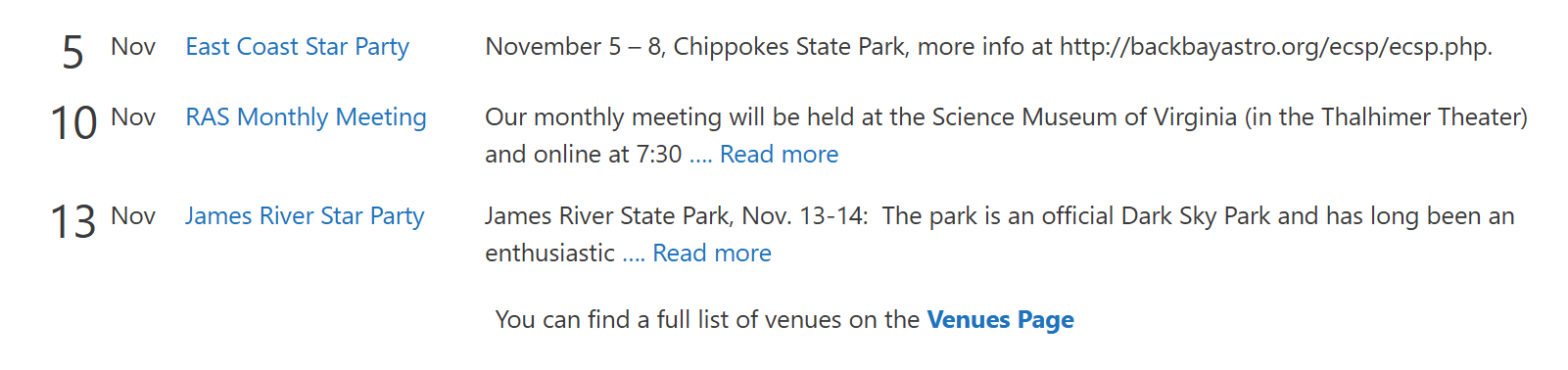
I am not seeing the 11/5 date anywhere. If you could clarify a bit or send a screenshot, that would be great!
-
teebark
11/5 is the first row-the big 5. The discrepancy only shows up in the mobile view.
-
teebark
I’ve outlined the problem line with red. Why is it different than the others?
https://imgur.com/hV1PFs9 -
Alvind
Hi there,
The difference is coming from the excerpt of the East Coast Star Party post. It includes a long URL with no spaces (http://backbayastro.org/ecsp/ecsp.php.), and text without spaces can’t wrap. On mobile, the loop item (
.gb-element-85dadd36) switches to a1fr 1fr 2frgrid. The URL is wider than the space the third column gets, so that column grows and pushes the other two columns out of line. The other venues’ excerpts are normal words that wrap, so they aren’t affected.Can you try adding this CSS?
@media (max-width: 767px) {
    .gb-element-85dadd36 {
        grid-template-columns: 1fr 1fr minmax(0, 2fr);
    }

    .gb-element-85dadd36 p {
        overflow-wrap: anywhere;
    }
}
This keeps the third column within its
2frshare and lets long URLs break onto the next line.Alternatively, you can edit the post and replace the raw URL with a text link such as “more info here”. That also stops the URL from stretching the column.
-
teebark
Even better, I just added the minmax to the layout section in edit. Worked great. Thanks so much.
-
Alvind
You’re welcome! 🙂


- You must be logged in to reply to this topic.