
-
malinoo
Hi there,
I am again struggeling with the form.
There is a bow-form, visible in my editor, but not on my website outside the editor.
Editor view: https://prnt.sc/vfUkpA7_9bD6
Website View: https://prnt.sc/DJ3j3skzBGYNWhy is this, can you help?
Best
Marco -
malinoo
On mobile there is another bug: There is some form somewhere in the middle: https://prnt.sc/I2TUM0mOWWQQ
This is also on my iphone 17 pro
This should be hidden.To be honest: Am I the only one struggeling with the forms. This is by far the most confusing thing with generate press.
-
Stefanie
Hi malinoo
Unfortunately, I can’t help you with your question, but can you tell me which tool you’re using for the responsive view?
Thanks,
Stefanie -
malinoo
The tool doesnt Matter, please check on your mobile.
-
-
Stefanie
Hallo malinoo
ich bin nicht vom Support-Team, ich bin hier nur gerade zufällig auf dein Ticket gestoßen und habe deinen screenshot von der mobilen Ansicht gesehen. Dabei habe ich mich gefragt, welches Tool du dafür nutzt.
Danke! -
malinoo
Das Tool macht keinen Unterschied. Bitte den Screenshot direkt von meinem Handy beachten: https://prnt.sc/T9fw63IOXcH6
-
Stefanie
Ja, ich weiß, dass das Tool keinen Unterschied macht für das Problem, dass du hast.
Ich wollte dich nur bitten, mir Auskunft zu geben über das Tool, was du dafür nutzt. Wenn du die Auskunft nicht geben möchtest, ist das natürlich ok. Ich bin auf der Suche nach einem solchen Tool und habe einfach gedacht, ich frage dich mal… -
malinoo
Das ist das Add-On für Chrome und heisst “Responsive Viewer”. Danke.
-
Stefanie
prima, vielen Dank! 👍
Hoffentlich kann der Support dir bald weiterhelfen (davon gehe ich aus, die haben für alles eine Lösung!)
Danke und viele Grüße
-
malinoo
first thing is solved… its visible
-
malinoo
OK . I just give everything up with your theme. There is everything fixed and everything. But still a green swosh. This should be the same color like the next section. https://prnt.sc/ki2UD-o8ivxI
Alvin always try to explain it to me that there is some background or something. I never understand your logic.
Please help and fix it on all devices: Laptop. Taplet, Mobil
Thnx
Marco
bit anoid from your logic -
George
Hi malinoo,
Glad to hear the first one came right.
Before I go further, one quick check so I’m looking at the right thing: when you say form, do you mean a shape or divider element rather than a contact form? The element you’ve circled looks like a shape divider sitting under the testimonial card, and I want to be sure we’re talking about the same thing.
On the first issue — did you publish the page between those two screenshots? Your browser is on a preview URL (
?preview_id=39740&preview=true) rather than the live page, and a preview can render differently from what’s actually published. If that was the cause, it may explain the second issue as well.On the mobile one, your Responsive Viewer screenshot is useful. The element shows at 393px, 390px and 360px, but not on the Pixel 7 Pro at 480px. By default GeneratePress and GenerateBlocks treat anything under 768px as mobile, so if this were hidden with the responsive visibility settings, all five frames would behave the same way. Something else is deciding it.
Two things that would help:
- Open the page in a desktop browser, set the window to roughly 500px wide, then drag it slowly narrower to about 360px and tell me the exact width at which the element appears.
- How is it set to be hidden — through the block’s responsive visibility settings, or with custom CSS you’ve added?
-
malinoo
Dont understand. Can you please fix my latest Problem:
OK . I just give everything up with your theme. There is everything fixed and everything. But still a green swosh. This should be the same color like the next section. https://prnt.sc/ki2UD-o8ivxI
Alvin always try to explain it to me that there is some background or something. I never understand your logic.
Please help and fix it on all devices: Laptop. Taplet, Mobil
Thnx
Marco
bit anoid from your logic -
George
Apologies for the confusion.
Select this shape here and click the color picker.
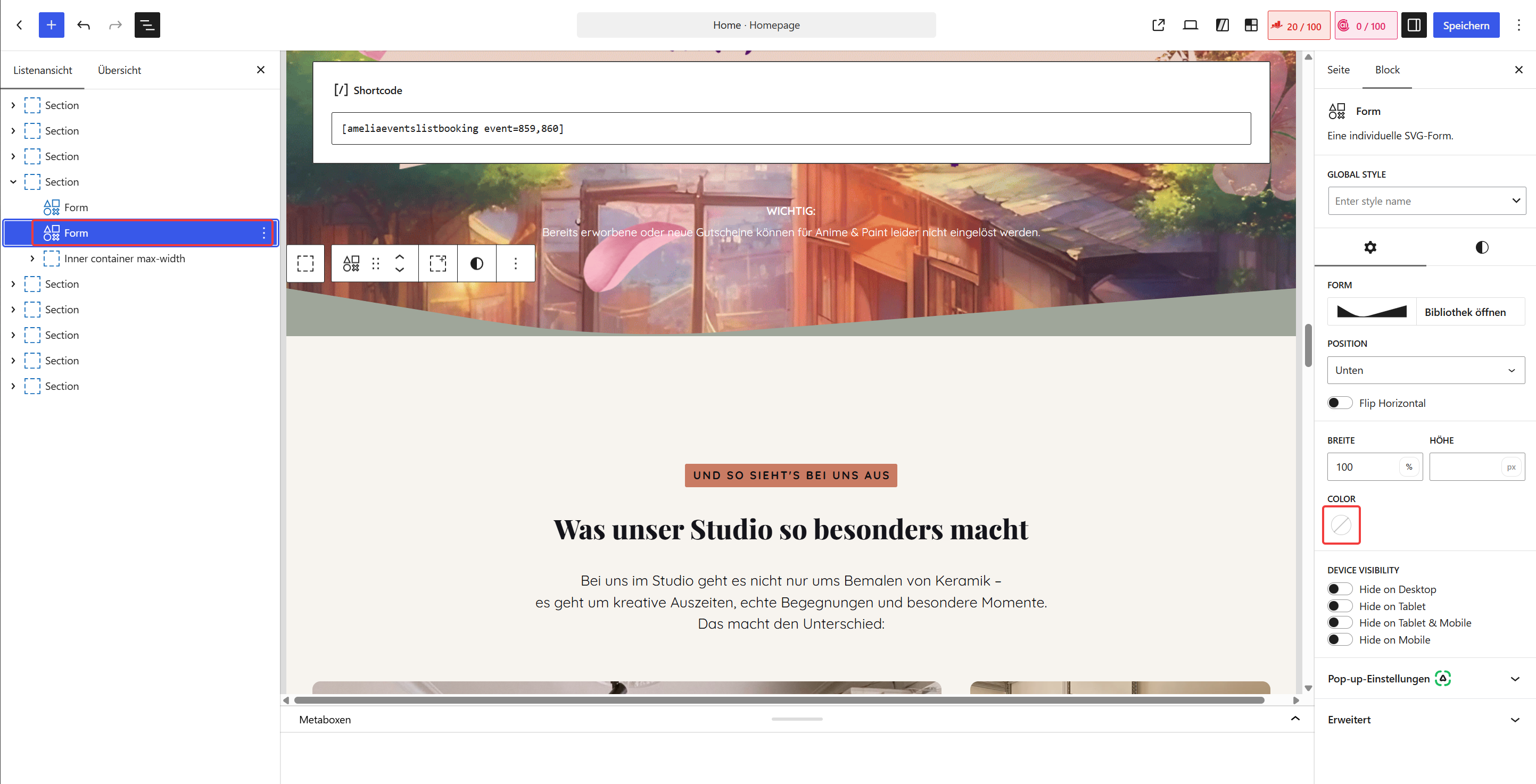
Choose the same color as your page’s background.

-
malinoo
Thx very much. This workd. But you have to do this one by one for all device typs.
Best
Marco


- You must be logged in to reply to this topic.