
-
vidyutdev
I have a date picker repeater field on ACF, then outputing the dates using GB Pro Query loop, just want to hide past dates…
Here is a screenshot of the frontend – https://postimg.cc/Q9y6gd9z
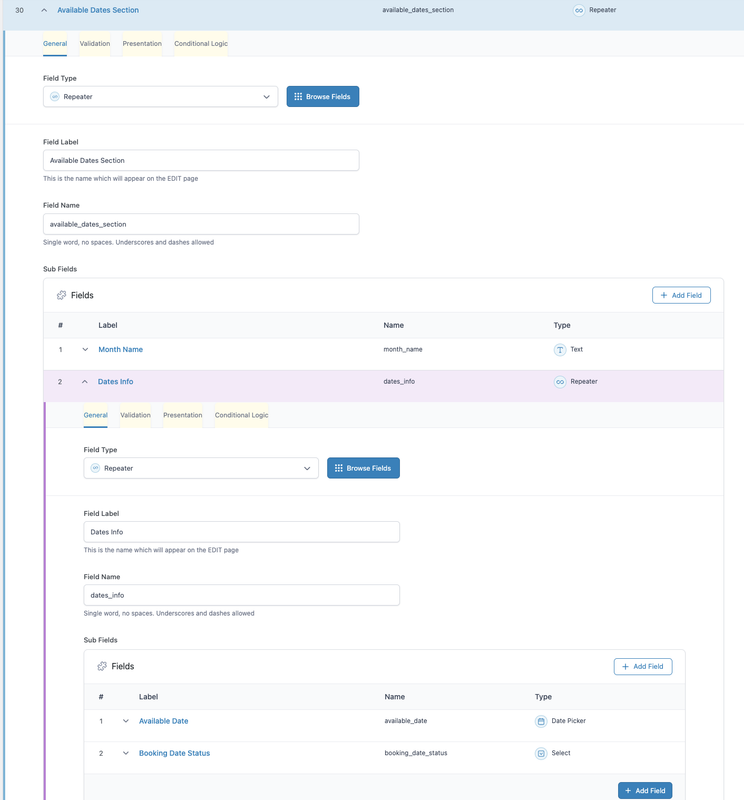
Here is the ACF Setup: https://i.postimg.cc/zGWpxzNZ/Screenshot-2026-01-18-at-10-18-02-AM.png
Thanks!
-
Alvind
Hi there,
Could you share the Query block settings showing how you’ve configured the repeater field as well?
-
vidyutdev
Yes its a nested repeater..
As GB Pro does not yet fully supports nested repeater, i have this setup.
Query setting: https://snipboard.io/Xkti8B.jpg
These are items hidden by default: https://snipboard.io/OCb41o.jpg
Thanks..
-
You might be able to use
render_block()filter. If the returned date is earlier than today, then do not render the block. -
vidyutdev
Ok, never used that filter,, can you share more details? Or even the code….
Thanks!
-
Can you provide an admin login to your site? I’m not sure if it’s going to work, I need more info to write the code.
-
vidyutdev
Sure, here is a staging site.
-
Alvind
I tried adding past dates to the repeater field, but they don’t seem to be saved. Could you check that?
-
vidyutdev
Yes its saving the dates, and old dates are not showing, great..
Did you added the code?
-
Alvind
No, I haven’t done anything. I mean when I add past dates, they don’t show up by default.
-
vidyutdev
I’m really sorry, there is a post save hook, to auto delete old dates on save…
Which i added long ago, for the client so at least they can manage.. But it is not a convenient thing as they now have a lot of tours.
Now, i disabled that, you can try now.
Thanks
-
Alvind
No problem, can you try this snippet:
add_filter( 'render_block', function( $block_content, $block ) { if ( empty( $block['attrs']['className'] ) || strpos( $block['attrs']['className'], 'date-row' ) === false ) { return $block_content; } // Extract the date from the block content preg_match( '/<p[^>]*class="[^"]*gb-text[^"]*"[^>]*>([A-Za-z]+ \d{1,2}, \d{4})<\/p>/', $block_content, $matches ); if ( empty( $matches[1] ) ) { return $block_content; } // Parse the date and compare with today $date = strtotime( $matches[1] ); $today = strtotime( 'today' ); if ( $date && $date < $today ) { return ''; // Hide past dates } return $block_content; }, 10, 2 ); -
vidyutdev
You’re great, thanks working like charm…
Another thing, these dates also get fetched on the fluentforms dynamically, can we pass data or something, if someone click on lets say January 11, 2026 the fluentoform modal will open with the selected date from the select field of fleuntform..
I understand the whole thing is not GB team’s scope, i need an idea. How it can work great.
You can check the form dates by clicking – ‘Book Now’ button on that page sidebar, and at bottom you’ll get the field of the dates.
Thanks again…
-
Alvind
Unfortunately I don’t have an idea of how to achieve that, as I’m not familiar with how Fluent Forms handles dynamic data fetching. They might be able to provide some guidance on this.
-
vidyutdev
Thanks, no issues..
-
Alvind
No problem!




- You must be logged in to reply to this topic.